Strengthen compliance and minimize privacy risks with flexible consent policies, smarter Direct Contact workflows, expanded RoPA export options, and more.
Welcome to DataGrail’s monthly release notes.
Our customers rely on DataGrail to tackle the most complex and high-demand privacy work, and that’s why we continue to deliver robust flexibility and customization options. This month, we’re launching updates designed to give privacy teams more control, help reduce compliance risks, protect sensitive data and maintain alignment with global regulations.
Let’s get into it.
More Control Over Privacy Workflows with Smarter Direct Contact Email Workflows and Intake Form Visibility
Getting the right information for privacy requests isn’t always straightforward, especially for teams relying on Direct Contact integrations. Last month, we introduced custom intake form questions to help teams capture more context at the point of request.
With our latest update, we’ve added additional flexibility to decide exactly what information is included in a Direct Contact workflow request, including responses to custom intake form questions.
This ensures you can give your team the exact context they need to extract or remove data from your systems while simultaneously excluding irrelevant or sensitive information from being shared with external processors.
This enhancement brings more control, helps streamline privacy requests, and creates a smoother experience for teams that rely on direct contacts to fulfill them.
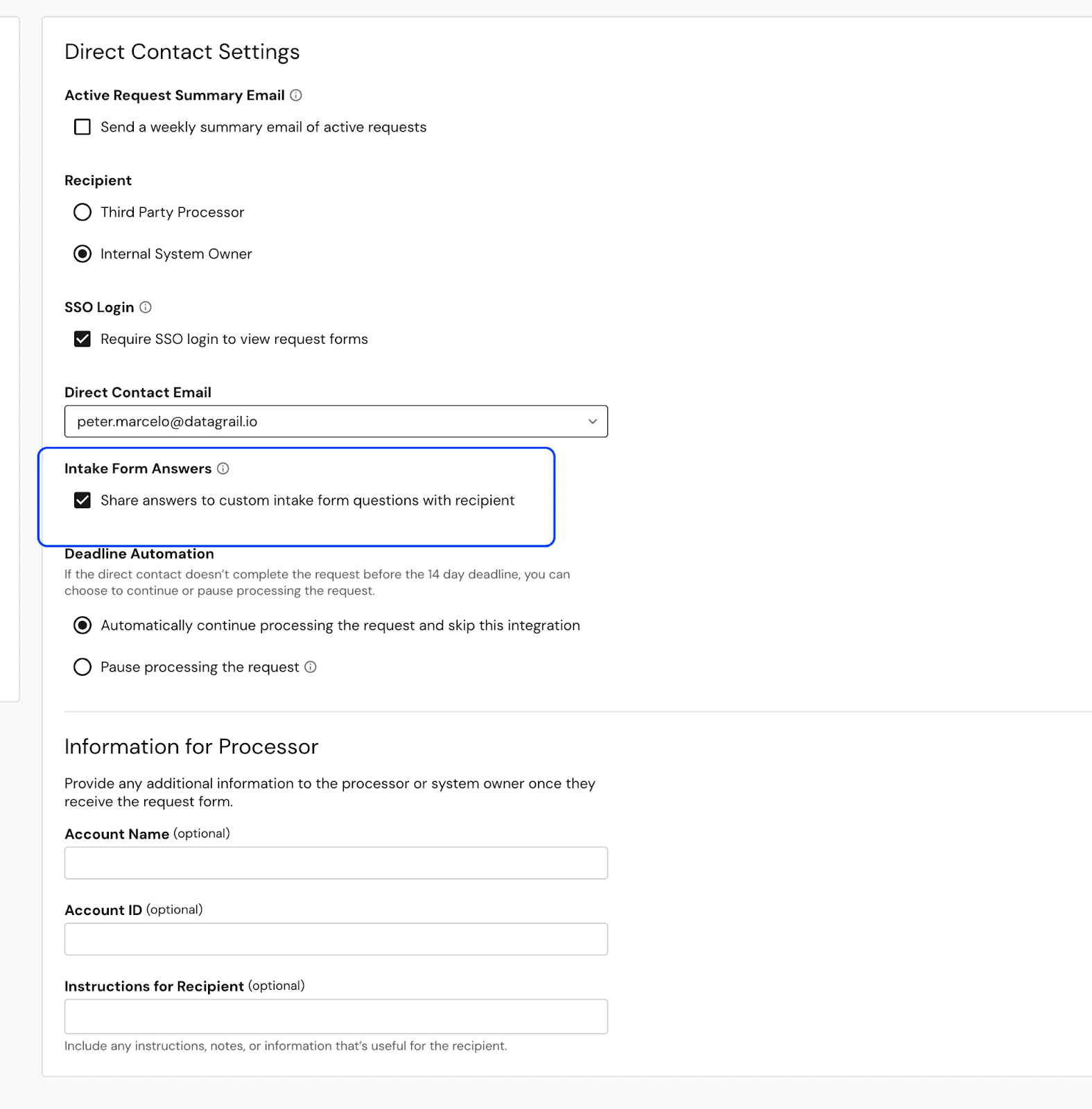

Make privacy requests easier to handle by giving your team the tools to:
- Capture the right context at intake
- Share relevant details via Direct Contact integration
- Control the visibility of sensitive data when working with external processors by hiding specific values as needed.
Adapt to Global Privacy Laws with Flexible Consent Settings
When it comes to consent management and respecting a growing list of regulations, it’s definitely not one-size-fits-all. Privacy teams need flexibility. Whether you’re managing GDPR in Europe, CPRA in California, or multiple state laws at once, the ability to fine-tune consent behavior is critical for compliance and building user trust.
Our latest update puts that control directly in your hands, giving you more granular options to configure how trackers and cookies behave, how browser signals are honored, and how opt-out requests are applied.

Initial Tracking Behavior: Replace “opt-in/opt-out” toggles with default categories by policy. Gain more flexibility to align with regional laws (e.g., enabling only essential, functional, and performance categories under CPRA) while still keeping broader defaults in other states as needed.
Browser Opt-Out Signal Handling: Decide exactly how GPC or DNT signals are honored and what categories remain active once received. Respect user preferences while tailoring behavior by regulation, creating a more transparent and trustworthy user experience.
Opt-Out Request Handling: Request Manager’s opt-out submissions can now be tied directly to consent preferences. This gives teams a more consistent way to apply opt-outs across policies, helping reduce manual effort and making it easier to align with user expectations.
Individual RoPA PDF Exports for More Granular Control
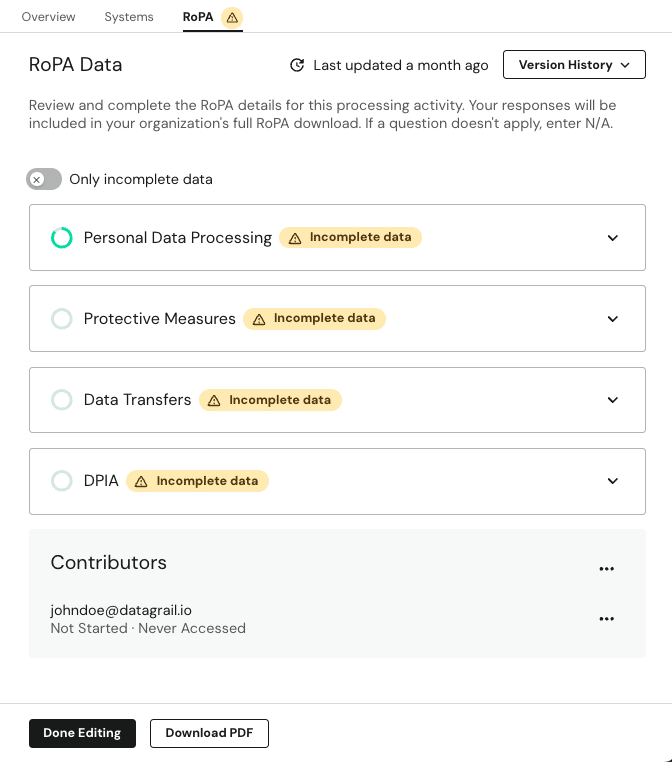
Privacy teams need flexibility when sharing Records of Processing Activities. Auditors and Stakeholders often need details on just once processing activity, which doesn’t require your entire RoPA.
With individual RoPA exports, teams can generate an external-ready PDF for a single processing activity, complete with your company logo, system descriptions, and all relevant details. This gives privacy teams greater control over what data is shared, reduces compliance risk, and ensures accurate, audit-ready reporting for stakeholders.
Name Fields Now Optional On Opt-Out Requests
In response to the Honda Settlement and numerous customer requests, we have made the first and last name fields optional for any method of intake for opt-out requests.
As noted by the CPPA in their settlement decision:
“The CCPA regulations governing the submission of Requests to Opt-Out of Sale/Sharing and Requests to Limit are meant to ensure that Consumers can exercise their choices without undue burden. Civ. Code § 1798.185(a)(4). These requests are not verifiable because the potential harm to Consumers resulting from an imposter accessing, deleting, or changing personal information maintained by the business is minimal or nonexistent for Requests to Opt-Out of Sale/Sharing and Requests to Limit.
Accordingly, the CCPA prohibits businesses from requiring Consumers to Verify themselves before processing Requests to Opt-Out of Sale/Sharing and Requests to Limit. Cal. Case No. ENF23-V-HO-2 6 STIPULATED FINAL ORDER Code Regs. tit. 11, §§ 7026(d), 7027(e), 7060(b). At most, businesses may ask Consumers for information necessary to complete the request, such as information necessary to identify the Consumer within their systems, but they may not ask Consumers for more information than necessary to process their requests. Civ. Code § 1798.135(c)(1); Cal. Code Regs. tit. 11, §§ 7026(d), 7027(e). To the extent that businesses can comply without additional information, they are required to do so. Id. at §§ 7026(c), 7027(d)
Requiring verification for the processing of a Request to Opt-Out of Sale/Sharing or Request to Limit impairs or interferes with the Consumer’s ability to exercise those rights. The CCPA prohibits businesses from designing methods for submitting CCPA Requests that substantially subverts or impairs the Consumer’s autonomy, decisionmaking, or choice. Id. § 7004; see also Civ. Code § 1798.140(h), (l).”
Name fields and other information are still required for other types of DSR requests, such as access and deletion requests.
New Integrations
Our industry-leading integration network continues to grow. We’ve added and updated integrations to help you securely discover and classify sensitive data and automatically access and delete personal data across your business.
Request Manager integrations:
- Marketo
- Custom Opt Out + deletion support
- Read connection instructions for Marketo here.
- Junction
- Added access + deletion support
- Read connection instructions for Junction here.
- Mixpanel
- New update
- Read how to reconnect Mixpanel using Service Account authentication here.
- Merge Recruiting Integrations
- Enabled Workday Recruiting & HR Cloud Recruiting integration for RM via Merge.
- Read connection instructions for Workday Recruiting here.
- Read connection instructions for HR Cloud Recruiting here.
Browse our complete integration directory here.
That’s a wrap on August release notes. You can always find an up-to-date changelog to DataGrail here. We love customer feedback and are always looking to improve the DataGrail platform. You can give our team feedback anytime in-app under ‘product feedback’ in the side navigation.
For questions, please reach out directly to your Account Manager or email [email protected]. If you’d like a demo of the DataGrail platform, reach out to us here.
Until next time. 👋
The DataGrail team