Introducing New AI-powered RoPAs, enhanced consent analytics, intelligent workflows for privacy requests, and much more.
Welcome to DataGrail’s monthly release notes.
The world of data privacy never stands still, and neither do our product and engineering teams. This month, we rolled out a range of big improvements and updates to give privacy teams better insights, AI-powered automation, and more flexibility across their privacy programs.
Let’s get into it.
Create an AI-powered Record of Processing Activities In Record Time
RoPAs (Records of Processing Activities) are only useful for GDPR, right? Not anymore! Accurate RoPAs are now required in 10+ US States, and they can serve as a phenomenal shortcut to faster AI governance and adoption.
Still, for many, creating and maintaining a RoPA can be one of the most manual, time-consuming, and error-prone parts of privacy compliance, leaving compliance efforts incomplete and risk exposure unchecked.
Our revolutionary AI-driven RoPA approach simplifies the process with a more intuitive, automated experience, designed to help privacy teams work faster and stay audit-ready.
Here’s an overview of what’s new. For the full details, read the launch blog.
AI-Recommended Processing Activities: Let our DataGrail AI Agent do the heavy lifting with auto-suggested processing activities based on your business context.
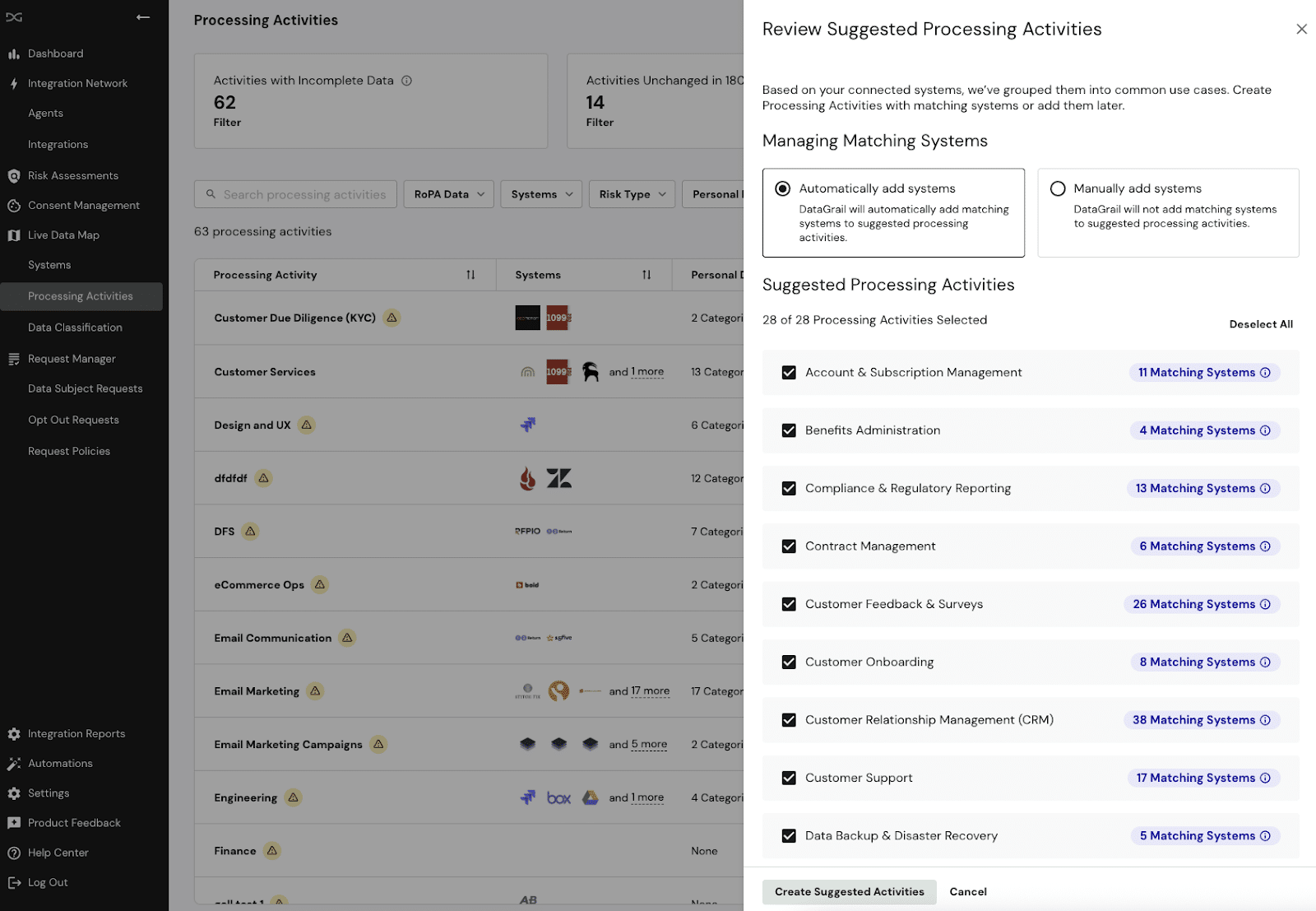
Decoupled System Inventory and Processing Activities: By shifting from a system-level approach to an activity-level approach, you gain more flexibility and better alignment with how privacy programs are structured, making it easier to maintain and ensure compliance with confidence.
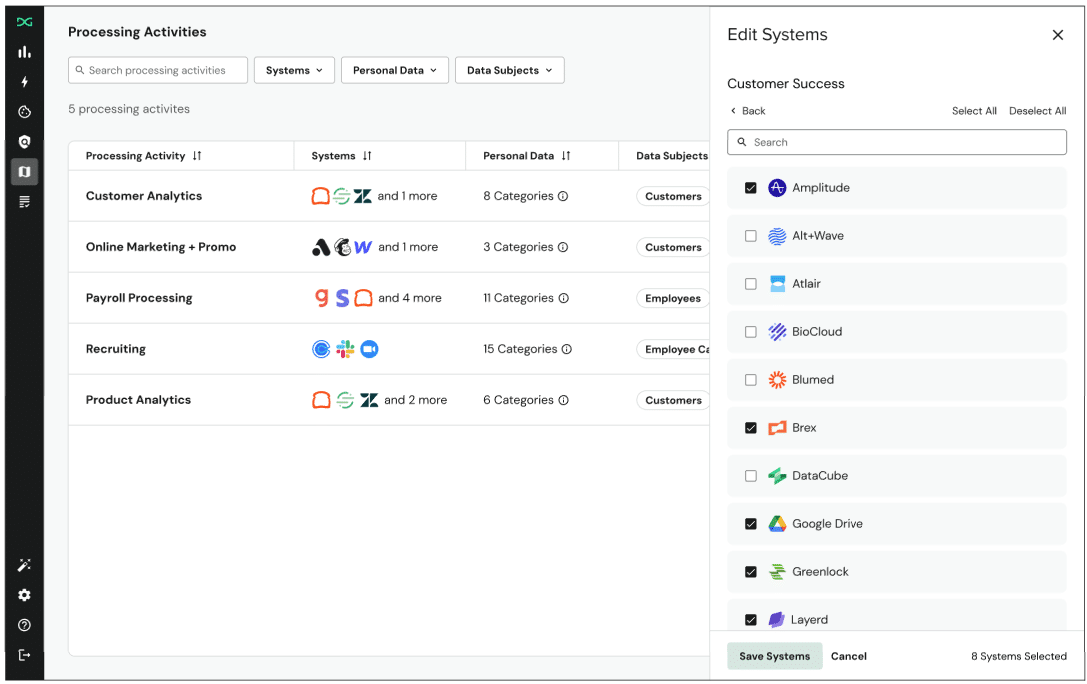
Pre-Populated RoPA Fields: We combine patented system detection and DataGrail AI to instantly convert your system metadata into structured, compliance-ready reports that show exactly where personal data lives and how it’s being used.

Audit-Ready RoPA CSV Exports: Export your entire RoPA, or a RoPA for a single process, in structured CSV format to easily share, audit, and operationalize across teams, eliminating rigorous manual tasks and freeing teams to focus more on proactive privacy management.
Watch this feature video to see it in action.
Optimize Your Consent Strategy with Improved Consent Banner Analytics
Consent banners are more than compliance tools, they’re critical touchpoints for building user trust and driving engagement.
With our latest update, privacy teams gain actionable visibility into how users interact with consent banners across regions and regulatory frameworks.
Consent Banner Interactions and analytics by policy allow you to track banner views by specific policies (like GDPR, CCPA) to better understand performance, identify friction points, make informed decisions backed by data, and refine your banner strategy to maximize transparency, trust and compliance.

Take the guesswork out of your consent strategy with:
- Banner view and dismissal (X button) metrics directly on your dashboard
- Instrumentation by policy (e.g. GDPR vs. CPRA)
Now you can measure the real impact of your consent banner interactions by region and policy, giving you greater control and insight into how privacy impacts your bottom line.
Smarter Privacy Request Automation with Conditional Workflows
Not every Data Subject Request follows the same path, and handling them all with the same process can create unnecessary friction and missed data. Last month we introduced support for creating custom questions for single and multi-select responses in the Privacy Request Center.
This month, we’re taking it a step further, those same responses can now be used as conditional triggers to intelligently route requests using Request Manager Automations. This means you can automatically route requests based on user input, ensuring the right systems and stakeholders are engaged from the start.
For example, many companies have multiple products tied to different backend databases and third-party Saas tools. With this new capability, you could add a custom dropdown question for which product a customer uses, and then create an automated workflow to address it with the appropriate systems and direct contacts, streamlining the process and optimizing fulfillment time.
This enhancement brings more precision, less manual effort, and smarter automation to your privacy operations.

What’s new:
- Custom dropdown questions as assignable conditions in Workflow Automations
- Clear UI indicators when questions are associated with specific policies
- Improved error notifications when workflows become invalid
- Proactive warnings and actionable guidance when customization changes affect existing workflows
To get started using intake response driven automation , read the full documentation here.
New Integrations
Our industry-leading integration network continues to grow. We’ve added and updated integrations to help you securely discover and classify sensitive data and automatically access and delete personal data across your business.
Request Manager integrations:
- Sift
- Added access + deletion support
- Read connection instructions for Sift here.
- Kount
- Added access + deletion support
- Read connection instructions for Kount here.
- Service Now
- Added updated access
- Read connection instructions for ServiceNow here.
- Salesforce
- Added updated access
- Read connection instructions for Salesforce here.
Improved Data Subject Request Visibility:
- Reordered DSR Integrations
- Learn more about Reordered Integrations here.
Browse our complete integration directory here.
That’s a wrap on July release notes. You can always find an up-to-date changelog to DataGrail here. We love customer feedback and are always looking to improve the DataGrail platform. You can give our team feedback anytime in-app under ‘product feedback’ in the side navigation.
For questions, please reach out directly to your Account Manager or email [email protected]. If you’d like a demo of the DataGrail platform, reach out to us here.
Until next time. 👋
The DataGrail team